import cdo does not work although it shows in conda list
Added by Clara Burgard over 4 years ago
Hello,
I want to use cdo through conda and python because the cdo installed on the common machine I am using is missing some properties I need.
I have installed it in my conda environment using conda install cdo and it appears when I do conda list.
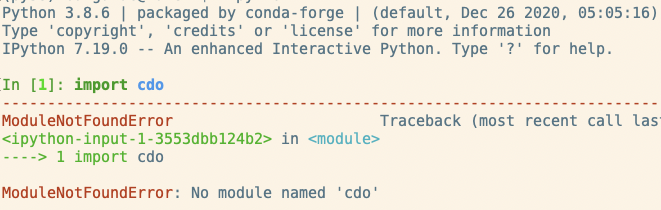
However, when I want to import cdo in python, it tells me ModuleNotFoundError: No module named 'cdo'. What am I missing here? Can someone help?
Thank you!

Replies (9)
RE: import cdo does not work although it shows in conda list - Added by Clara Burgard over 4 years ago
Hello again,
I have now understood that I had to install the python wrapper as well! Sorry for the inconvenience!
RE: import cdo does not work although it shows in conda list - Added by Ralf Mueller over 4 years ago
hi clara!
in case you have issues with python-cdo you can also message here
cheers
ralf
RE: import cdo does not work although it shows in conda list - Added by Clara Burgard over 4 years ago
Thank you Ralf!
Actually, I am now stuck when applying the cdo commands in python.
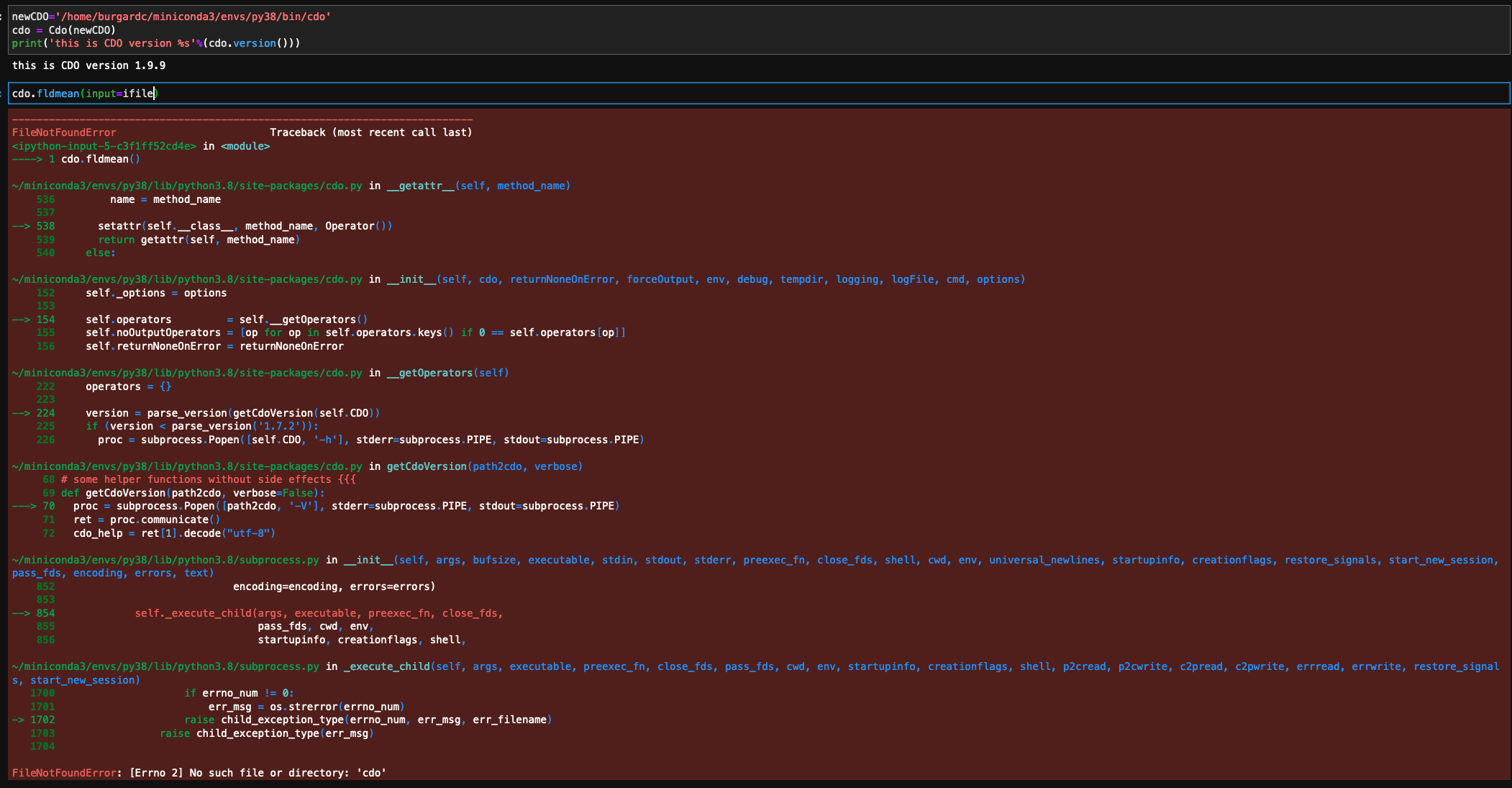
I think I pointed the Cdo() to the right bin-path.
But now I always get the error "FileNotFoundError: [Errno 2] No such file or directory: 'cdo'" (see attached screenshot)
Do you see if I am doing an obviously wrong thing?
Thank you!
RE: import cdo does not work although it shows in conda list - Added by Ralf Mueller over 4 years ago
you have to create the cdo object with a special cdo path like this
cdo = Cdo(cdo=newCdo)
in case you have the cdo package installed in your activated environment, given the explicit path should not be necessary. by default, python-cdo takes the what ever is available in your $PATH variable
hth
ralf
RE: import cdo does not work although it shows in conda list - Added by Clara Burgard over 4 years ago
Thank you again. Unfortunately this does not help 
'in case you have the cdo package installed in your activated environment, given the explicit path should not be necessary. by default, python-cdo takes the what ever is available in your $PATH variable' => unfortunately, this gives me the error directly, so it seems like he does not find the path directly
if I do:cdo = Cdo(cdo=newCdo) with newCdo = '/home/burgardc/miniconda3/envs/py38/bin/cdo'
I get exactly the same error as in the screenshot posted above...
RE: import cdo does not work although it shows in conda list - Added by Ralf Mueller over 4 years ago
ok, let me try to set up a similar conda env and test this myself
RE: import cdo does not work although it shows in conda list - Added by Ralf Mueller over 4 years ago
here is what I did
conda update --all
conda create -n cdo
conda activate cdo
conda install cdo python-cdo xarray
checked cdo with
cdo -V                                                                                                                                                                                                                                                                                                                    ─╯
Climate Data Operators version 1.9.9 (https://mpimet.mpg.de/cdo)
System: x86_64-conda-linux-gnu
CXX Compiler: /home/conda/feedstock_root/build_artifacts/cdo_1604652667339/_build_env/bin/x86_64-conda-linux-gnu-c++ -fPIC -DPIC -g -O2 -std=c++11 -fopenmp -DACCEPT_USE_OF_DEPRECATED_PROJ_API_H=1  -march=nocona -mtune=haswell -ftree-vectorize -fPIC -fstack-protector-strong -fno-plt -O2 -ffunction-sections -pipe -isystem /home/ram/.miniconda3/envs/cdo/include -fdebug-prefix-map=/home/conda/feedstock_root/build_artifacts/cdo_1604652667339/work=/usr/local/src/conda/cdo-1.9.9 -fdebug-prefix-map=/home/ram/.miniconda3/envs/cdo=/usr/local/src/conda-prefix -fopenmp -pthread
CXX version : unknown
C Compiler: /home/conda/feedstock_root/build_artifacts/cdo_1604652667339/_build_env/bin/x86_64-conda-linux-gnu-cc -DACCEPT_USE_OF_DEPRECATED_PROJ_API_H=1  -march=nocona -mtune=haswell -ftree-vectorize -fPIC -fstack-protector-strong -fno-plt -O2 -ffunction-sections -pipe -isystem /home/ram/.miniconda3/envs/cdo/include -fdebug-prefix-map=/home/conda/feedstock_root/build_artifacts/cdo_1604652667339/work=/usr/local/src/conda/cdo-1.9.9 -fdebug-prefix-map=/home/ram/.miniconda3/envs/cdo=/usr/local/src/conda-prefix -fopenmp -pthread -pthread
C version : unknown
F77 Compiler: /home/conda/feedstock_root/build_artifacts/cdo_1604652667339/_build_env/bin/x86_64-conda-linux-gnu-gfortran -fopenmp -march=nocona -mtune=haswell -ftree-vectorize -fPIC -fstack-protector-strong -fno-plt -O2 -ffunction-sections -pipe -isystem /home/ram/.miniconda3/envs/cdo/include -fdebug-prefix-map=/home/conda/feedstock_root/build_artifacts/cdo_1604652667339/work=/usr/local/src/conda/cdo-1.9.9 -fdebug-prefix-map=/home/ram/.miniconda3/envs/cdo=/usr/local/src/conda-prefix
F77 version : GNU Fortran (crosstool-NG 1.24.0.133_b0863d8_dirty) 9.3.0
Features: 15GB 8threads C++11 OpenMP45 Fortran PTHREADS HDF5 NC4/HDF5/threadsafe OPeNDAP UDUNITS2 PROJ XML2 CURL FFTW3 SSE3
Libraries: HDF5/1.10.6 proj/7.2.0 xml2/2.9.10 curl/7.71.1
Filetypes: srv ext ieg grb1 grb2 nc1 nc2 nc4 nc4c nc5
     CDI library version : 1.9.9
 cgribex library version : 1.9.5
 ecCodes library version : 2.20.0
  NetCDF library version : 4.7.4 of Dec 14 2020 16:14:56 $
    hdf5 library version : 1.10.6 threadsafe
    exse library version : 1.4.1
    FILE library version : 1.9.1
and then I started python:
python                                                                                                                                                                                                                                                                                                                    ─╯
Python 3.9.1 | packaged by conda-forge | (default, Jan 26 2021, 01:34:10)
[GCC 9.3.0] on linux
Type "help", "copyright", "credits" or "license" for more information.
Could not open PYTHONSTARTUP
FileNotFoundError: [Errno 2] No such file or directory: '/home/ram/.pythonrc'
>>> from cdo import Cdo
>>> cdo = Cdo()
-->> Could not load netCDF4! <<--
>>> cdo.version()
'1.9.9'
>>> cdo.fldmean(input='-topo')
-->> Could not load netCDF4! <<--
-->> Could not load netCDF4! <<--
'/tmp/cdoPy3be_aalf'
did you work in a loaded conda environment?
RE: import cdo does not work although it shows in conda list - Added by Ralf Mueller over 4 years ago
>>> from cdo import Cdo
>>> cdo = Cdo(cdo='/home/ram/.miniconda3/envs/cdo/bin/cdo')
>>> cdo.version()
'1.9.9'
>>> cdo.fldmean(input='-topo')
'/tmp/cdoPynl7mg2q2'
>>> cdo.fldmean(input='-topo',debug=True)
'/tmp/cdoPyodopu434'
obviously it also works WITHOUT activating a conda environment, when the path to cdo is given
RE: import cdo does not work although it shows in conda list - Added by Clara Burgard over 4 years ago
Very interesting. Thanks for taking the time to try it with me!
Sooo, when I try it in the terminal, it works perfectly well, just as you showed. I just get the error when I import cdo in my jupyter notebook. So it is probably some path problem related to my jupyterlab setup!
Good, then I'll see if I can find out what's the problem there. Seems like it's not a cdo problem then!
Thanks again!